How to convert DVD to iPod?
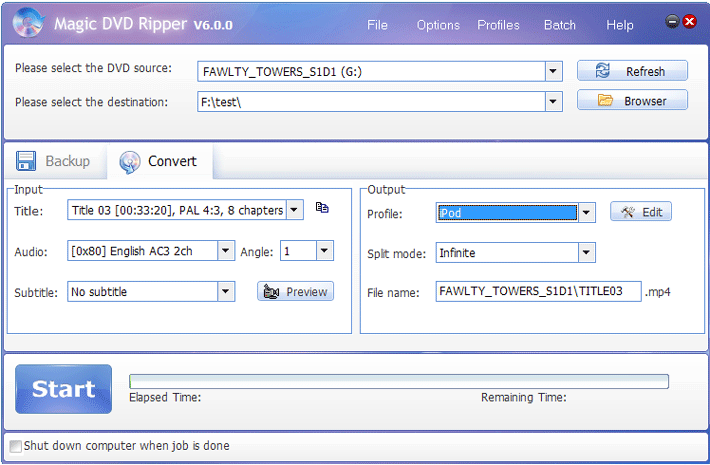
1. Launch Magic DVD Ripper and click the "Convert" tab.
2. Insert your DVD into your DVD-ROM drive.
3. Specify the destination to save the output ipod file.
4. Choose a proper title, audio track and subtitle you like.
5. Choose "iPod" from the "Profile" dropdown list.
6. Press the "Start" button to start ripping.
 Return to Magic DVD Ripper
 Download Magic DVD Ripper
 Special Offer - save $28.99: Magic DVD Ripper for only $49.95 (Full license + Lifetime upgrades)
Tag: dvd,ipod


Readers also visit these :
- How to convert DVD to other formats?
- How to convert DVD to DivX?
- How to convert DVD to WMV?
- How to convert DVD to PSP?
- How to Copy G.I. Joe: Retaliation DVD to a blank DVD disc?
Related Questions :
Registration Benefits
- A full license to use the software
- FREE technical support via e-mail for lifetime
- 30-Day Money Back Guarantee
Awards and Users reviews
-
This software is excellent and well worth the money spent to buy it. Guys you wont be sorry buying this product to backup your movies. I recommend taking both MagicDVDRipper and Copier as bundle. -- Gerald
-
Excellent product. I am yet to use a DVD ripper so effective and easy to use. -- Anuj Sehgal
-
Excellent program! Other dvd rippers gave me choppy audio and video, but this dvd ripper has always worked perfectly!
-
Magic DVD ripper is great for everything else. Bulletproof in defeating copy protection; good speed on encoding. I've paid for lifetime upgrades and would like to get this working at a higher quality. --- Randy Steck
a professional DVD ripping software available in the market for quite a long time. --- reviews from techulator.com
-