How to adjust the profile to get suitable quality and file size?
1. Choose "Profile Editor ..." from the "Profiles" menu, then you will get the following window.
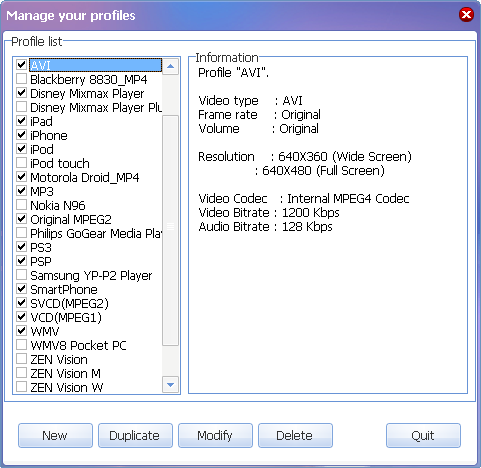
2. On this window, you may click "New" to create a new profile; Click "Delete" to delete the profile you choose. If you want to edit a specified profile, please click "Modify". Then the following window will show up..
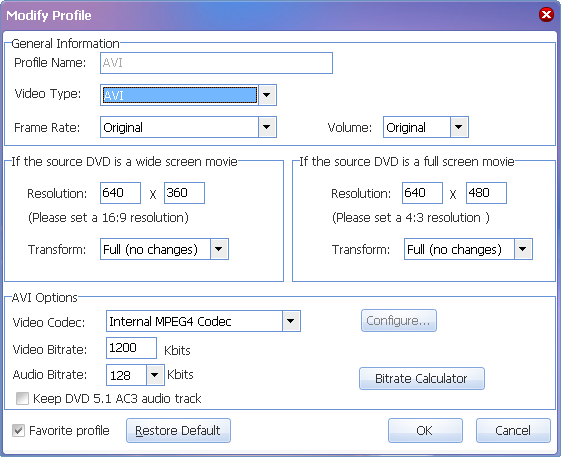
3. There are many parameters on the window. You can adjust them according to your demand. Among them, the video bitrate is the key of video quality. The higher the bitrate, the better the quality but the file size is larger too. The resolution is another parameter to influence quality. The higher the resolution, the better the quality. But because the resolution of source DVD is 720*480, increasing the resolution too much will not improve the quality. The highest value we recommend is 640*480.
 Return to Magic DVD Ripper
 Download Magic DVD Ripper
 Special Offer - save $28.99: Magic DVD Ripper for only $49.95 (Full license + Lifetime upgrades)
Tag: convert,dvd,profile,quality


Readers also visit these :
- How to convert DVD to other formats?
- How to convert DVD to divx avi format?
- How to copy DVD to hard disk and playback it?
- How to copy a DVD movie without any loss of quality?
- How to get higher quality of DivX movies and suitable file size?
Related Questions :
Registration Benefits
- A full license to use the software
- FREE technical support via e-mail for lifetime
- 30-Day Money Back Guarantee
Awards and Users reviews
-
This software is excellent and well worth the money spent to buy it. Guys you wont be sorry buying this product to backup your movies. I recommend taking both MagicDVDRipper and Copier as bundle. -- Gerald
-
Excellent product. I am yet to use a DVD ripper so effective and easy to use. -- Anuj Sehgal
-
Excellent program! Other dvd rippers gave me choppy audio and video, but this dvd ripper has always worked perfectly!
-
Magic DVD ripper is great for everything else. Bulletproof in defeating copy protection; good speed on encoding. I've paid for lifetime upgrades and would like to get this working at a higher quality. --- Randy Steck
a professional DVD ripping software available in the market for quite a long time. --- reviews from techulator.com
-